Pangolin Tutorial
1 介绍
Pangolin 是一组轻量级和可移植的实用程序库,用于制作基于 3D、数字或视频的程序和算法的原型。 它在计算机视觉领域被广泛使用, 作为删除特定于平台的样板并使数据可视化变得容易的一种手段。
Pangolin 的总体精神是通过简单的界面和工厂,而不是窗口和视频,最大限度地减少样板文件并最大限度地提高可移植性和灵活性。 它还提供了一套用于交互式调试的实用程序,例如 3D 操作、绘图仪、调整变量,以及用于 python 脚本和实时调整的下拉式类似 Quake 的控制台。
主要特点
- 跨平台窗口
为 Windows、Linux、OSX 和 Web 构建(使用 Emscripten)
支持不同的窗口实现,包括离屏缓冲区
- 视口管理和交互
简单而高效的视口管理
直观的 3D 导航和处理程序
使用计算机视觉和机器人相机和坐标约定的实用程序
- 视频输入和输出
用于普通和机器视觉相机和媒体格式的广泛视频输入/输出包装器
灵活的过滤器接口,可轻松对视频通道和格式等进行后期处理。
- 调整变量
有 101 个小部件库和几个 ‘tweak’ var 库 - Pangolin 提供了另一种实现,具有一些优点和缺点
单行定义和可扩展类型
- 下拉控制台
可针对不同的 shell 进行扩展,但目前支持 Python 实时控制台
轻松访问自省调整变量
code
# Clone Pangolin along with it's submodules
git clone --recursive https://github.com/stevenlovegrove/Pangolin.git
2 HelloPangolin
demo调用, 源码
TEST(HelloPangolin, hello)
{
    HelloPangolin demo;
    demo.RunDemo();
}
函数使用:
void HelloPangolin::RunDemo()
{
    ::pangolin::CreateWindowAndBind("Main",640,480);
    glEnable(GL_DEPTH_TEST);

    // Define Projection and initial ModelView matrix
    ::pangolin::OpenGlRenderState s_cam(
        ::pangolin::ProjectionMatrix(640,480,420,420,320,240,0.2,100),
        ::pangolin::ModelViewLookAt(-2,2,-2, 0,0,0, ::pangolin::AxisY)
    );

    // Create Interactive View in window
    ::pangolin::Handler3D handler(s_cam);
    ::pangolin::View& d_cam = ::pangolin::CreateDisplay()
            .SetBounds(0.0, 1.0, 0.0, 1.0, -640.0f/480.0f)
            .SetHandler(&handler);

    while( !::pangolin::ShouldQuit() )
    {
        // Clear screen and activate view to render into
        glClear(GL_COLOR_BUFFER_BIT | GL_DEPTH_BUFFER_BIT);
        d_cam.Activate(s_cam);

        // Render OpenGL Cube
        ::pangolin::glDrawColouredCube();

        // Swap frames and Process Events
        ::pangolin::FinishFrame();
    }
}
运行结果
[bin] ./xslam.pangolin.hello_pangolin_test
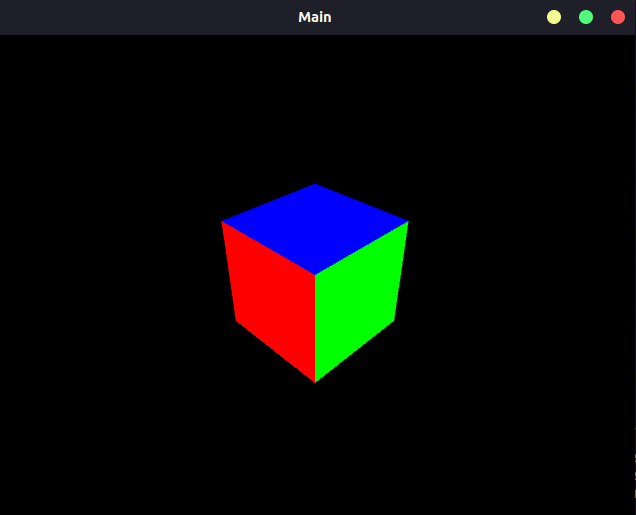
参考源码:
Note
hello_pangolin_test.cpp
hello_pangolin.cpp
hello_pangolin.h
3 SimpleDisplay
demo调用, 源码
TEST(SimpleDisplay, hello)
{
    SimpleDisplay demo;
    demo.RunDemo();
}
函数使用:
void SimpleDisplay::RunDemo()
{
    // Create OpenGL window in single line
    ::pangolin::CreateWindowAndBind("Main",640,480);

    // 3D Mouse handler requires depth testing to be enabled
    glEnable(GL_DEPTH_TEST);

    // Define Camera Render Object (for view / scene browsing)
    ::pangolin::OpenGlRenderState s_cam(
        ::pangolin::ProjectionMatrix(640,480,420,420,320,240,0.1,1000),
        ::pangolin::ModelViewLookAt(-0,0.5,-3, 0,0,0, ::pangolin::AxisY)
    );

    // Choose a sensible left UI Panel width based on the width of 20
    // charectors from the default font.
    const int UI_WIDTH = 20* ::pangolin::default_font().MaxWidth();

    // Add named OpenGL viewport to window and provide 3D Handler
    ::pangolin::View& d_cam = ::pangolin::CreateDisplay()
        .SetBounds(0.0, 1.0, ::pangolin::Attach::Pix(UI_WIDTH), 1.0, 640.0f/480.0f)
        .SetHandler(new ::pangolin::Handler3D(s_cam));

    // Add named Panel and bind to variables beginning 'ui'
    // A Panel is just a View with a default layout and input handling
    ::pangolin::CreatePanel("ui")
        .SetBounds(0.0, 1.0, 0.0, ::pangolin::Attach::Pix(UI_WIDTH));

    // Safe and efficient binding of named variables.
    // Specialisations mean no conversions take place for exact types
    // and conversions between scalar types are cheap.
    ::pangolin::Var<bool> a_button("ui.A_Button",false,false);
    ::pangolin::Var<double> a_double("ui.A_Double",3,0,5);
    ::pangolin::Var<int> an_int("ui.An_Int",2,0,5);
    ::pangolin::Var<double> a_double_log("ui.Log_scale",3,1,1E4, true);
    ::pangolin::Var<bool> a_checkbox("ui.A_Checkbox",false,true);
    ::pangolin::Var<int> an_int_no_input("ui.An_Int_No_Input",2);
    ::pangolin::Var<std::string> a_string("ui.A_String", "Edit ME!");

    // std::function objects can be used for Var's too. These work great with C++11 closures.
    ::pangolin::Var<std::function<void(void)>> save_window("ui.Save_Window", [](){
        ::pangolin::SaveWindowOnRender("window");
    });

    ::pangolin::Var<std::function<void(void)>> save_cube_view("ui.Save_Cube", [&d_cam](){
        ::pangolin::SaveWindowOnRender("cube", d_cam.v);
    });

    // Demonstration of how we can register a keyboard hook to alter a Var
    ::pangolin::RegisterKeyPressCallback(::pangolin::PANGO_CTRL + 'b', [&](){
        a_double = 3.5;
    });

    // Default hooks for exiting (Esc) and fullscreen (tab).
    while( !::pangolin::ShouldQuit() )
    {
        // Clear entire screen
        glClear(GL_COLOR_BUFFER_BIT | GL_DEPTH_BUFFER_BIT);

        if( ::pangolin::Pushed(a_button) )
        std::cout << "You Pushed a button!" << std::endl;

        // Overloading of Var<T> operators allows us to treat them like
        // their wrapped types, eg:
        if( a_checkbox )
        an_int = (int)a_double;

        an_int_no_input = an_int;

        if(d_cam.IsShown()) {
            // Activate efficiently by object
            d_cam.Activate(s_cam);

            // Render some stuff
            glColor3f(1.0,1.0,1.0);
            ::pangolin::glDrawColouredCube();
        }

        // Swap frames and Process Events
        ::pangolin::FinishFrame();
    }
}
运行结果
[bin] ./xslam.pangolin.simple_display_test
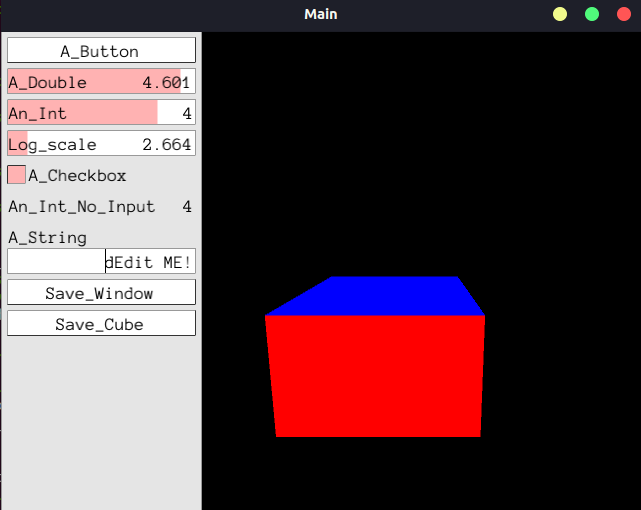
参考源码:
Note
simple_display_test.cpp
simple_display.cpp
simple_display.h
4 SimpleMultiDisplay
demo调用, 源码
TEST(SimpleMultiDisplay, hello)
{
    SimpleMultiDisplay demo;
    demo.RunDemo();
}
函数使用:
void SimpleMultiDisplay::RunDemo()
{
    // Create OpenGL window in single line
    ::pangolin::CreateWindowAndBind("Main",640,480);

    // 3D Mouse handler requires depth testing to be enabled
    glEnable(GL_DEPTH_TEST);

    // Issue specific OpenGl we might need
    glEnable (GL_BLEND);
    glBlendFunc (GL_SRC_ALPHA, GL_ONE_MINUS_SRC_ALPHA);

    // Define Camera Render Object (for view / scene browsing)
    ::pangolin::OpenGlMatrix proj = ::pangolin::ProjectionMatrix(640,480,420,420,320,240,0.1,1000);
    ::pangolin::OpenGlRenderState s_cam(proj, ::pangolin::ModelViewLookAt(1,0.5,-2,0,0,0, ::pangolin::AxisY) );
    ::pangolin::OpenGlRenderState s_cam2(proj, ::pangolin::ModelViewLookAt(0,0,-2,0,0,0, ::pangolin::AxisY) );

    // Add named OpenGL viewport to window and provide 3D Handler
    ::pangolin::View& d_cam1 = ::pangolin::Display("cam1")
        .SetAspect(640.0f/480.0f)
        .SetHandler(new ::pangolin::Handler3D(s_cam));

    ::pangolin::View& d_cam2 = ::pangolin::Display("cam2")
        .SetAspect(640.0f/480.0f)
        .SetHandler(new ::pangolin::Handler3D(s_cam2));

    ::pangolin::View& d_cam3 = ::pangolin::Display("cam3")
        .SetAspect(640.0f/480.0f)
        .SetHandler(new ::pangolin::Handler3D(s_cam));

    ::pangolin::View& d_cam4 = ::pangolin::Display("cam4")
        .SetAspect(640.0f/480.0f)
        .SetHandler(new ::pangolin::Handler3D(s_cam2));

    ::pangolin::View& d_img1 = ::pangolin::Display("img1")
        .SetAspect(640.0f/480.0f);

    ::pangolin::View& d_img2 = ::pangolin::Display("img2")
        .SetAspect(640.0f/480.0f);

    // LayoutEqual is an EXPERIMENTAL feature - it requires that all sub-displays
    // share the same aspect ratio, placing them in a raster fasion in the
    // viewport so as to maximise display size.
    ::pangolin::Display("multi")
        .SetBounds(0.0, 1.0, 0.0, 1.0)
        .SetLayout(::pangolin::LayoutEqual)
        .AddDisplay(d_cam1)
        .AddDisplay(d_img1)
        .AddDisplay(d_cam2)
        .AddDisplay(d_img2)
        .AddDisplay(d_cam3)
        .AddDisplay(d_cam4);

    const int width =  64;
    const int height = 48;
    unsigned char* imageArray = new unsigned char[3*width*height];
    ::pangolin::GlTexture imageTexture(width,height,GL_RGB,false,0,GL_RGB,GL_UNSIGNED_BYTE);

    // Default hooks for exiting (Esc) and fullscreen (tab).
    while( !::pangolin::ShouldQuit() )
    {
        glClear(GL_COLOR_BUFFER_BIT | GL_DEPTH_BUFFER_BIT);

        // Generate random image and place in texture memory for display
        setImageData(imageArray,3*width*height);
        imageTexture.Upload(imageArray,GL_RGB,GL_UNSIGNED_BYTE);

        glColor3f(1.0,1.0,1.0);

        d_cam1.Activate(s_cam);
        ::pangolin::glDrawColouredCube();

        d_cam2.Activate(s_cam2);
        ::pangolin::glDrawColouredCube();

        d_cam3.Activate(s_cam);
        ::pangolin::glDrawColouredCube();

        d_cam4.Activate(s_cam2);
        ::pangolin::glDrawColouredCube();

        d_img1.Activate();
        glColor4f(1.0f,1.0f,1.0f,1.0f);
        imageTexture.RenderToViewport();

        d_img2.Activate();
        glColor4f(1.0f,1.0f,1.0f,1.0f);
        imageTexture.RenderToViewport();

        // Swap frames and Process Events
        ::pangolin::FinishFrame();
    }

    delete[] imageArray;
}

void SimpleMultiDisplay::setImageData(unsigned char * imageArray, int size)
{
    for(int i = 0 ; i < size;i++)
    {
        imageArray[i] = (unsigned char)(rand()/(RAND_MAX/255.0));
    }
}
运行结果
[bin] ./xslam.pangolin.simple_multi_display_test
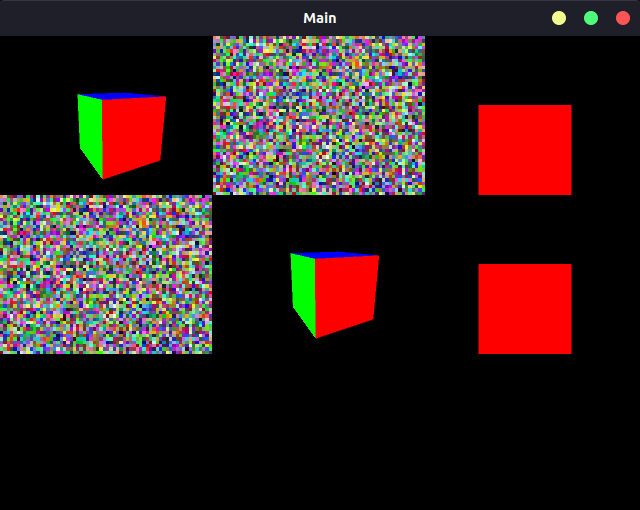
参考源码:
Note
simple_multi_display_test.cpp
simple_multi_display.cpp
simple_multi_display.h
5 SimplePlot
demo调用, 源码
TEST(SimplePlot, hello)
{
    SimplePlot demo;
    demo.RunDemo();
}
函数使用:
void SimplePlot::RunDemo()
{
    // Create OpenGL window in single line
    ::pangolin::CreateWindowAndBind("Main",640,480);

    // Data logger object
    ::pangolin::DataLog log;

    // Optionally add named labels
    std::vector<std::string> labels;
    labels.push_back(std::string("sin(t)"));
    labels.push_back(std::string("cos(t)"));
    labels.push_back(std::string("sin(t)+cos(t)"));
    log.SetLabels(labels);

    const float tinc = 0.01f;

    // OpenGL 'view' of data. We might have many views of the same data.
    ::pangolin::Plotter plotter(&log,0.0f,4.0f*(float)M_PI/tinc,-2.0f,2.0f,(float)M_PI/(4.0f*tinc),0.5f);
    plotter.SetBounds(0.0, 1.0, 0.0, 1.0);
    plotter.Track("$i");

    // Add some sample annotations to the plot
    plotter.AddMarker(::pangolin::Marker::Vertical,   -1000, ::pangolin::Marker::LessThan, ::pangolin::Colour::Blue().WithAlpha(0.2f) );
    plotter.AddMarker(::pangolin::Marker::Horizontal,   100, ::pangolin::Marker::GreaterThan, ::pangolin::Colour::Red().WithAlpha(0.2f) );
    plotter.AddMarker(::pangolin::Marker::Horizontal,    10, ::pangolin::Marker::Equal, ::pangolin::Colour::Green().WithAlpha(0.2f) );

    ::pangolin::DisplayBase().AddDisplay(plotter);

    float t = 0;

    // Default hooks for exiting (Esc) and fullscreen (tab).
    while( !::pangolin::ShouldQuit() )
    {
        glClear(GL_COLOR_BUFFER_BIT | GL_DEPTH_BUFFER_BIT);

        log.Log(sin(t),cos(t),sin(t)+cos(t));
        t += tinc;

        // Render graph, Swap frames and Process Events
        ::pangolin::FinishFrame();
    }
}
运行结果
[bin] ./xslam.pangolin.simple_plot_test
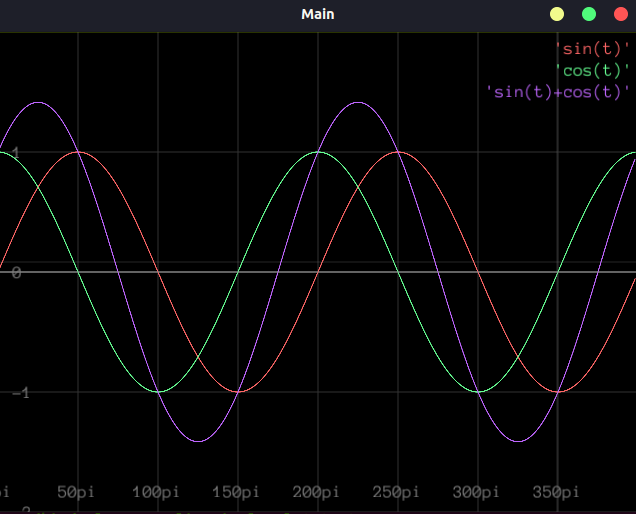
参考源码:
Note
simple_plot_test.cpp
simple_plot.cpp
simple_plot.h