libQGLViewer Tutorial
1 介绍
libQGLViewer 是一个基于 Qt 的 C++ 库,可简化 OpenGL 3D 查看器的创建。 它提供了一些典型的 3D 查看器功能,例如使用鼠标移动相机的可能性,这是大多数其他 API 所缺乏的。 其他功能包括鼠标操作帧、插值关键帧、对象选择、立体显示、屏幕截图保存等等。 它可以供 OpenGL 初学者使用, 也可以用于创建复杂的应用程序,完全可定制且易于扩展。
2 SimpleViewer
demo调用, 源码
TEST(SimpleViewer, demo)
{
    SimpleViewer demo;
    demo.RunDemo();
}
函数使用:
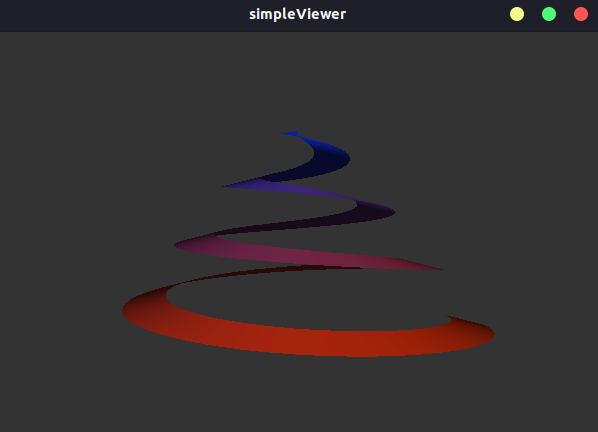
// Draws a spiral
void Viewer::draw()
{
    const float nbSteps = 200.0;

    glBegin(GL_QUAD_STRIP);
    for (int i = 0; i < nbSteps; ++i)
    {
        const float ratio = i / nbSteps;
        const float angle = 21.0 * ratio;
        const float c = cos(angle);
        const float s = sin(angle);
        const float r1 = 1.0 - 0.8f * ratio;
        const float r2 = 0.8f - 0.8f * ratio;
        const float alt = ratio - 0.5f;
        const float nor = 0.5f;
        const float up = sqrt(1.0 - nor * nor);
        glColor3f(1.0 - ratio, 0.2f, ratio);
        glNormal3f(nor * c, up, nor * s);
        glVertex3f(r1 * c, alt, r1 * s);
        glVertex3f(r2 * c, alt + 0.05f, r2 * s);
    }
    glEnd();
}

void Viewer::init()
{
    // Restore previous viewer state.
    restoreStateFromFile();

    // Opens help window
    help();
}

QString Viewer::helpString() const
{
    QString text("<h2>S i m p l e V i e w e r</h2>");
    text += "Use the mouse to move the camera around the object. ";
    text += "You can respectively revolve around, zoom and translate with the "
            "three mouse buttons. ";
    text += "Left and middle buttons pressed together rotate around the camera "
            "view direction axis<br><br>";
    text += "Pressing <b>Alt</b> and one of the function keys "
            "(<b>F1</b>..<b>F12</b>) defines a camera keyFrame. ";
    text += "Simply press the function key again to restore it. Several "
            "keyFrames define a ";
    text += "camera path. Paths are saved when you quit the application and "
            "restored at next start.<br><br>";
    text +=
        "Press <b>F</b> to display the frame rate, <b>A</b> for the world axis, ";
    text += "<b>Alt+Return</b> for full screen mode and <b>Control+S</b> to save "
            "a snapshot. ";
    text += "See the <b>Keyboard</b> tab in this window for a complete shortcut "
            "list.<br><br>";
    text += "Double clicks automates single click actions: A left button double "
            "click aligns the closer axis with the camera (if close enough). ";
    text += "A middle button double click fits the zoom of the camera and the "
            "right button re-centers the scene.<br><br>";
    text += "A left button double click while holding right button pressed "
            "defines the camera <i>Revolve Around Point</i>. ";
    text += "See the <b>Mouse</b> tab and the documentation web pages for "
            "details.<br><br>";
    text += "Press <b>Escape</b> to exit the viewer.";
    return text;
}

void SimpleViewer::RunDemo()
{
    // // Read command lines arguments.
    int argc = 1;
    char **argv = NULL;
    QApplication application(argc, argv);

    // Instantiate the viewer.
    Viewer viewer;
    viewer.setWindowTitle("simpleViewer");

    // Make the viewer window visible on screen.
    viewer.show();

    // Run main loop.
    application.exec();
}
运行结果
[bin] ./bin/xslam.libQGLViewer.simple_viewer_test
参考源码:
Note
simple_viewer_test.cpp
simple_viewer.cpp
simple_viewer.h